 Voice Trap VST / DirectX Plug-in
vocal track eliminator & isolator
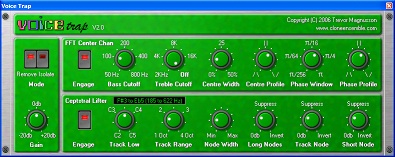
Remove vocal for karaoke (not hip)
Isolate vocal for remixing/mash-ups (way hip)
Sophisticated FFT & cepstral algorithms, not "left minus right"
Back in the old days you could remove the vocal from a stereo track by subtracting the left channel from the right.
* You only got mono output,
* The bass was missing,
* The mix sounded terrible,
* You could only remove the vocal, not isolate it,
* It only really worked on old tracks, before they started using stereo reverb.
Voice trap offers two sophisticated DSP algorithms:
* FFT-based center channel suppression / isolation,
* Cepstral liftering (an advanced technique that can identify harmonically rich elements in a mix).
Together these allow Voice Trap to overcome those problems:
* The output is stereo,
* The bass frequencies are left untouched,
* The mix is largely preserved,
* You can choose to remove the vocal OR isolate it,
* Good results possible on some modern tracks (ie, with stereo reverb).
Listen
This first example MP3 (290k) was made using Voice Trap V1.0, and demonstrates the FFT-based center-channel method. You'll hear a short segment of a song: once through, then again with the vocal removed in the first phrase, isolated in the second.
In this second example MP3 (419k) we choose a more challenging track - a more modern production with stereo ambience. Voice Trap V2.0 was used, making use of both center-channel and cepstral liftering methods.
NB: Note that both the removal and isolation aren't perfect - there is always a fine line between not enough removal / isolation, and too many artifacts.
However, the effect is state of the art, and is a very valuable tool for either both Karaoke and remix/mash-up projects. You may even find that the artifacts add a certain flavour to the remix.
Download
Download the DirectX version of Voice Trap now (891k).
Download the VST (Windows) version of Voice Trap now (686k).
NB: This is a 32-bit plugin. If you are using a 64-bit host app, you will need a bitbridge. I recommand jBridge.
NB: This plugin may not work at sample rates of 192 KHz. I recommend using sample rates of 96 KHz or below.
The freeware versions is restricted so that you cannot adjust most of the knobs,
so you are hardwired to a pretty narrow range of settings.
(You'll be able to hear it working and test compatibility with your host apps,
but you probably won't be able to fine tune it to your chosen track.)
Learn more
More info: Voice Trap User Notes.
Will it run under your audio host? Check out Compatibility Notes.
Need help installing? Check out Installation Notes
Screen-reader friendly version for blind users available here.
Register
NB: STOP!!! Please download, install and test Voice Trap before registering!
*** SERIOUSLY - INSTALL BEFORE PAYING!!! ***
To register your copy of Voice Trap, please send $25 to our
PayPal account.
NB: Please include your email address in the comment!
PayPal protects your personal information so diligently that I won't be able to email
your unlock code if you don't do this!
When I recieve notification (mentioning which plugin you want to register),
I will generate your unlock code and personally email it to you.
NB: When entering your registration code:
* Use Copy/Paste, don't try to type it
* Please include the "Curly brace" {} characters around the code.
Data Privacy
When you register, I keep a copy of all the details you provide - name, email, address, product purchased, along with the unlock code you are sent.
This data is used for one purpose, and one purpose only: to assist you if lose that unlock code (disk crash, new computer, lost email, mists of time).
Every few weeks I get an email requesting this service.
About three times (since 2001) I have sent unsolicited emails (aka spam) informing customers of new or updated products, the last time was in 2005 (I think).
This data is securely stored, and I have not (and will not ever), pass this data on to any third party.
Some unsolicited user testimonials:
...I also bought your voice trap plug, which is a big step up from the basic voc rem progs out there. Thanks a lot... V.Kevin Martin, producer. www.risingsonstudios.com
Hey, I finally finished that mashup which you helped me with by removing Geddy's voice from sections of 'Tom Sawyer': Enjoy, and thanks again. Jay Braun
I must say how impressed I am with the audio quality after removing vocals with Voice Trap. It is light years ahead of the vocals remover built into Audacity. Tim Worley.
Change history:
15 September 2010: Version 2.0c - improve registration behaviour in fix face of Windows' increased security features
17 January 2007: Version 2.0b - fix cosmetic problem when displayed on "Large Fonts" (120 DPI) displays
15 August 2006: Version 2.0a
* Slightly more useful demo version
14 August 2006: Version 2.0
* Cepstral liftering algorithm added
* Profile control for center width and phase window settings
24 April 2006: Version 1.2
* New skin
* Logarithmic scale on phase window control
27 November 2005: Version 1.1 released
* added treble cutoff control
* slight reduction in artifacts on high "centre width" settings
13 October 2005: Version 1.0 released
All content and software Copyright 2010 Trevor Magnusson
| × | |